


No web cam gimmick
A native app camera flow built for consistent face scans and history — not a browser toy.
Free to start
Install GlowUp, snap a clear selfie, and see facial structure, contour, symmetry, skin quality, and glow potential — free to download.
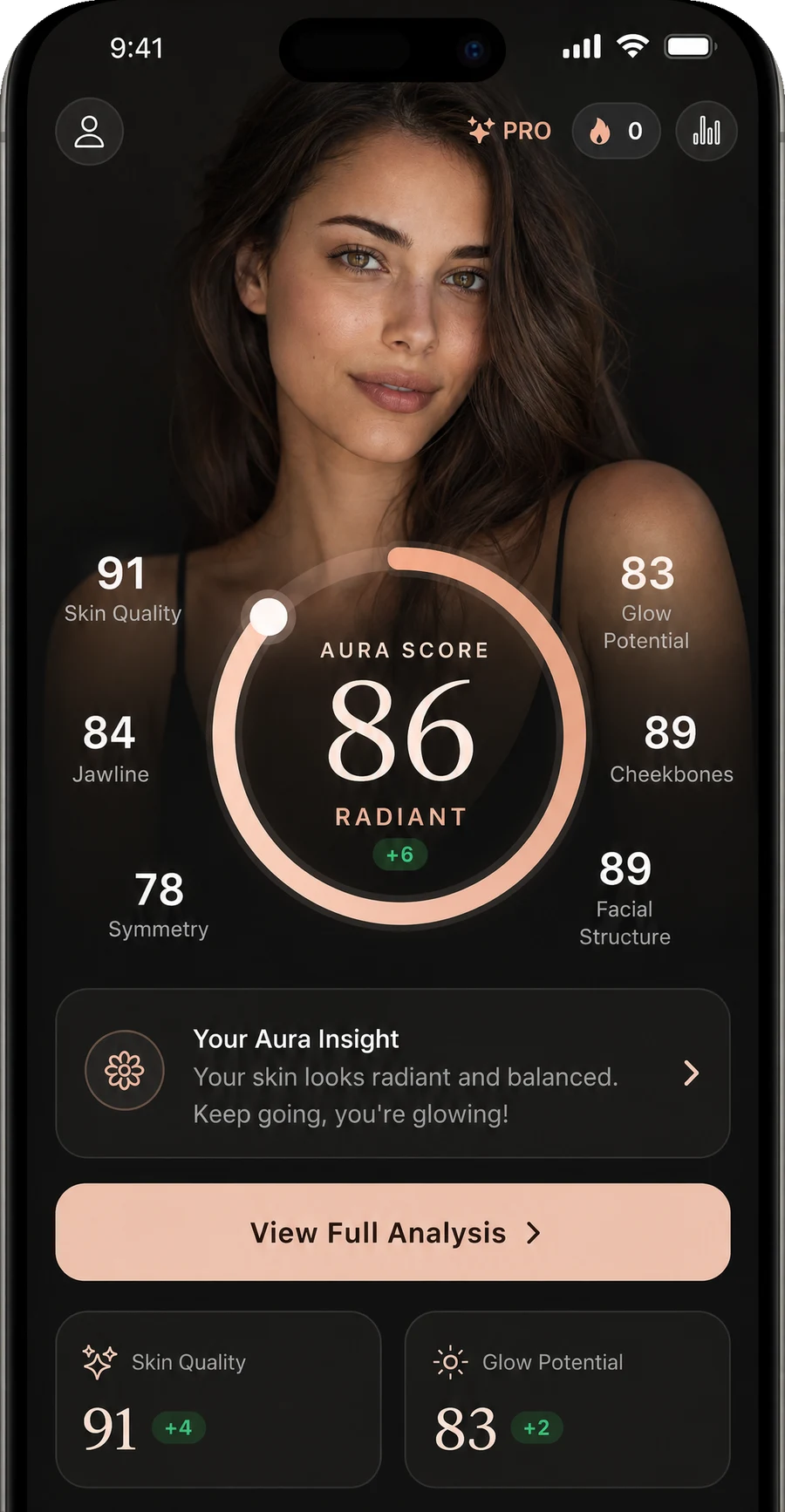
A native app camera flow built for consistent face scans and history — not a browser toy.
Start free; GlowUp Pro is there when you want the full depth.
Your first scan is the baseline every future scan is measured against, so it is worth setting up properly rather than firing one off in bed with a lamp to one side. Use natural light, ideally facing a window, so both sides of your face are lit evenly. Hold the phone at eye level and face it straight on — a low angle softens the jaw and a high one exaggerates it, and either will bake a distortion into your baseline that follows you through every comparison. Keep a neutral expression, move hair off the forehead and jaw, and turn off every beauty filter; a filtered baseline gives you a skin score for software, not skin. Pick an ordinary day rather than your best or worst, because the point of a baseline is that it is representative. Ten minutes of care here is what makes the next three months of tracking mean something.
The scan is a full analysis, not a teaser number. GlowUp returns six scores from your selfie: the overall Aura Score on a 0–100 scale, plus Skin Quality, Glow Potential, Contour (labelled Jawline in parts of the app), Facial Structure (labelled Cheekbones in places), and Symmetry. Around the numbers you get a short written summary of how your face reads, three to five specific strengths, and improvement areas ranked HIGH, MEDIUM, or LOW so you know what would move your score most. The app also generates a personal routine — five to eight steps, split into morning and evening, matched to the skin type you selected during onboarding. For context on the numbers: the bands run 90+ Excellent, 85+ Radiant, 80+ Glowing, 65+ Balanced, with Building below that, and first scans typically land in the mid-50s to mid-60s by design, leaving honest room to climb.
GlowUp is free to download on iOS and Android, and the free experience is a genuine starting point rather than a locked door. Going deeper is what GlowUp Pro is for — the subscription that unlocks the app’s full depth, offered weekly or annually with the price shown directly in the App Store or Google Play for your country and currency. The weekly option suits trying the full experience around a specific push, like a 30-day skin sprint; annual suits the way the app is actually designed to be used, since glow-ups run on months of consistency and comparison, not days. Two things the pricing model deliberately avoids: no prices are hardcoded on this site, because your store shows the accurate figure for your region, and there is no third pricing tier maze — it is one subscription, two billing periods, cancel any time through your store account.
A reasonable instinct with free face-scan tools is to ask what happens to the photo, because with many free tools online the honest answer is unclear. GlowUp’s answer is short and verifiable in its policy: photos are never stored, shared, or used for AI training, and each one is deleted right after your results are created. The scan produces scores, a summary, and a routine — those stay in your account as your history; the selfie itself does not persist anywhere. There is no public feed, no leaderboard of faces, and nothing is shared unless you choose to show someone your results yourself. The business model is equally plain: the app is funded by the GlowUp Pro subscription, not by your data. If a free scan elsewhere cannot tell you where the photo goes, that silence is the answer.
Downloading GlowUp and starting a scan is free on both iOS and Android. GlowUp Pro, a weekly or annual subscription priced in your local store, unlocks the full depth of the app.
Prices are read live from the App Store and Google Play for your country, so the accurate figure is always the one shown in the app. It is sold as a weekly or an annual subscription, cancellable through your store account.
You get started by answering two onboarding questions — your skin type (Normal, Dry, Oily, Combination, or Sensitive) and gender — which the app uses to personalise your routine and product ratings.
The app has a rescan cooldown regardless of plan — it asks you to wait before scanning again, because skin barely changes in a day and back-to-back scans would only measure lighting.
It is deleted right after your results are created. Photos are never stored, shared, or used for AI training — your scores stay, the image does not.
Free to start. Scan once, read the six-score breakdown, track what improves.
Free download on iOS and Android.
